Apple always knows how to grab attention. Every year, a new iOS update rolls in with buzzwords, promises, and sleek keynote presentations. But let’s be honest: most users don’t care about developer tools or behind-the-scenes tweaks. They want to know:
“How does this actually make my iPhone better?”
So here’s the short version: we sifted through every announcement, beta demo, and expert opinion, and found the top 12 features of iOS 26 that actually matter. The ones that impact you, not just the headlines.
Want the official scoop? Check the iOS 26 preview on Apple.com for everything they announced.
Let’s dive in.
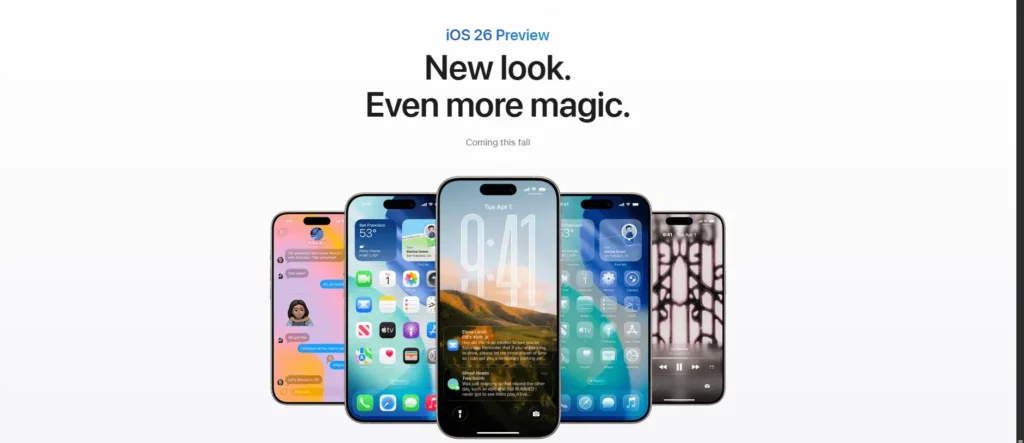
🔐 1. Lock Any App Natively (Finally)
No more relying on Screen Time hacks or third-party workarounds. iOS 26 now lets you lock any app using Face ID, Touch ID, or your passcode natively. Whether it’s WhatsApp, Photos, or Notes, you now have real privacy control built in.Whether it’s WhatsApp, Photos, or Notes, you now have real privacy control built‑in.
🧠 2. Apple Intelligence (AI Features Are Here)
Apple has finally stepped into the AI arena, meet Apple Intelligence, the brand‑new system‑wide AI platform. Think of it as a smarter Siri, better autocorrect, personalised writing suggestions and yes Apple is officially partnering with OpenAI to bring ChatGPT capabilities into iOS 26.
ChatGPT Integration (via OpenAI)
Apple is partnering with OpenAI to bring ChatGPT directly into iOS 26. It’s integrated through Siri and systemwide writing tools — meaning you can ask complex questions, generate ideas, or even rewrite emails with natural, human-like responses. Most importantly, Apple says this happens securely, with full user consent and on-device privacy as the priority.
It’s rolling out gradually, but it’s Apple’s clearest signal yet that AI is no longer optional; it’s baked into your iPhone.
🎨 3. Custom Icons and Layouts — Like Android, But Apple-Style
iOS 26 now lets you customise your app icons and home screen layout far more than ever. Change icon colours, move apps freely (no more grid lock), and even place widgets exactly where you want them. If you’ve ever envied Android’s freedom, this is Apple’s most flexible version yet, but still polished and user-friendly.
📥 4. iMessages Work Without Internet (via Satellite)
Even without internet or mobile data, you can now send iMessages using satellite connectivity (on supported models). Great for emergencies, travel, or just when you’re stuck with zero bars, this feature pushes iPhone communication into new territory.
💬 5. Message Scheduling Is Here
Yes, it finally happened. iOS 26 lets you schedule iMessages to send later. Whether it’s a midnight birthday wish or a business follow-up, this is one of those features that feels obvious, but has been missing for years.
📞 6. Call Screening Just Got Smarter
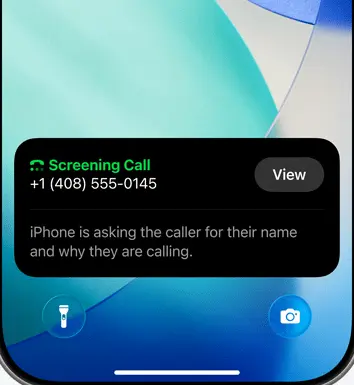
If you’ve ever hesitated to answer a call from an unknown number, iOS 26 now has your back. With Smart Call Screening, your iPhone will automatically ask unknown callers to state their name and reason for calling before ringing your phone.
This AI-powered upgrade is especially useful for filtering spam and robocalls without blocking real people. It works entirely on-device for privacy, and if you do miss a call, their response gets transcribed instantly for your review.
📥 7. Redesigned Mail with Auto Categorisation
Apple Mail is getting a major overhaul. Think Gmail-style smart categories: Primary, Transactions, Updates, Promotions. Emails will now be automatically sorted to help you stay focused and less overwhelmed.
🔎 8. Safari Gets a Smarter Reader View
Safari’s Reader View now does more than strip ads. It can summarise articles, show key points, and even help you get the gist of a page at a glance. Perfect for research, reading on the go, or just avoiding info overload.
📱 9. Control Center Customisation
You can now rearrange and expand the Control Center like never before. Add controls, adjust layout, swipe through multiple pages, and finally, a more powerful and personal quick settings experience.
🧷 10. Hidden & Locked Apps in a Private Folder
Apps you hide or lock now vanish from Spotlight, notifications, and app lists. They go into a private, hidden folder – only accessible with authentication. This is next-level privacy.
🔑 11. Passwords App — Finally a Native Password Manager
Apple is introducing a standalone Passwords app, pulling all your iCloud Keychain data into one place. It’s clean, easy to use, and now works across devices. A clear push to compete with apps like LastPass and 1Password, without the extra subscription.
🎮 12. Game Mode for iPhone
Gaming on iOS just got a performance boost. Game Mode minimises background tasks and prioritises GPU and CPU for smoother frame rates and lower latency, especially useful for online multiplayer and resource-intensive games.
Want technical details? Here’s the full Apple Developer’s breakdown.
🧩 iOS 26 Compatible Devices
Wondering if your iPhone supports iOS 26? Here’s the full list of devices Apple confirms will get the update:
- iPhone 16e
- iPhone 16
- iPhone 16 Plus
- iPhone 16 Pro
- iPhone 16 Pro Max
- iPhone 15 / 15 Plus / 15 Pro / 15 Pro Max
- iPhone 14 / 14 Plus / 14 Pro / 14 Pro Max
- iPhone 13 / 13 mini / 13 Pro / 13 Pro Max
- iPhone 12 / 12 mini / 12 Pro / 12 Pro Max
- iPhone 11 / 11 Pro / 11 Pro Max
- iPhone SE (2nd gen and later)
📌 Note: Some features like Apple Intelligence may only work on newer models (A17+ chip).
🧠 Final Takeaway
iOS 26 isn’t just a visual refresh. It’s a subtle but smart evolution, one that adds real-world functionality while finally addressing long overdue user requests.
From privacy and personalisation to AI and performance, this update balances flash with substance. If you’re already on iOS, these features will impact your daily experience, not just your settings menu.
If you’re planning to update, this might be one of the most practical iOS upgrades in years. No fluff, just solid improvements.
Want more breakdowns like this?
Bookmark the blog, deeper reviews, and app-specific guides for iOS 26 features are coming soon.

[…] 👉 If you’re an iPhone user, don’t miss our deep dive into 11 iOS 18 features that make a difference. […]